What Is a Plural Nouns Anchor Chart?
An anchor chart is a visual reference tool that teachers display in the classroom to reinforce key concepts. When the focus is plural nouns, the chart provides students with a quick‑look guide for turning singular nouns into their plural forms, spotting irregular patterns, and remembering rules that often cause confusion.
Why a Dedicated Chart Matters
English learners encounter three main challenges with plurals:
- Applying the regular “add s” rule.
- Recognizing spelling changes (e.g., city → cities).
- Remembering irregular forms (mouse → mice, child → children).
Having a single, well‑organized chart reduces the need to flip through textbooks or search online, allowing students to focus on practice instead of hunting for answers.
Core Sections of a Plural Nouns Anchor Chart
1. Regular Rules at a Glance
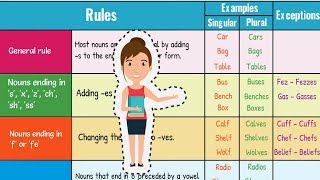
Most nouns become plural by adding s. The chart should list the three most common variations:
- Simple add‑s: dog → dogs, book → books.
- Add‑es for sibilant endings: bus → buses, box → boxes, wish → wishes.
- Change y to ies: baby → babies, city → cities (when the y follows a consonant).
2. Spelling Adjustments
Students often forget the subtle changes needed for nouns ending in:
- f or fe → ves: leaf → leaves, wife → wives.
- o → oes (or s): hero → heroes, piano → pianos (note the exception).
- Consonant + y → ies: party → parties.
3. Irregular Plurals
Irregular nouns cannot be guessed from a rule, so the chart must list them explicitly. A concise table format works well:
- man → men
- woman → women
- child → children
- foot → feet
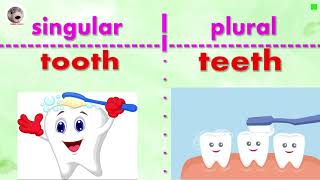
- tooth → teeth
- mouse → mice
- goose → geese
- person → people
4. Collective Nouns and Special Cases
While the primary goal is to show plural formation, it helps to remind students that some nouns stay the same in both singular and plural form (e.g., sheep, fish). Adding a small “Special Cases” box prevents misconceptions later.
Design Tips for an Effective Chart
Creating a chart that students actually use requires thoughtful design:
- Color coding: Use one color for regular